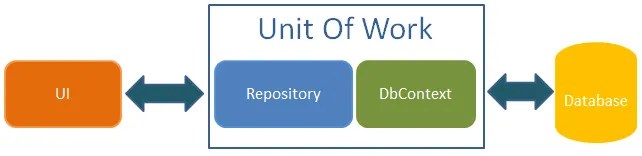
In modern .NET applications, efficient data management is crucial for ensuring consistency and performance. One common challenge arises when dealing with multiple database operations that need to be executed as a single unit to maintain data integrity. This is where the Unit of Work (UoW) pattern comes into play.
The Unit of Work pattern helps manage database transactions effectively, ensuring that all related operations succeed or fail together. In this article, we will explore a practical business scenario that benefits from UoW, discuss why this pattern is the right choice, and provide a step-by-step implementation in .NET.
Business Scenario
Consider an e-commerce platform where customers place orders. When an order is placed, multiple actions must occur:
- The order details must be saved in the database.
- The product inventory needs to be updated.
- A payment transaction must be recorded.
If any of these operations fail (e.g., payment processing error), we need to roll back all changes to prevent inconsistencies. Without a proper mechanism, we risk issues like reducing inventory for an order that never gets placed. The Unit of Work pattern helps solve this problem by grouping these actions into a single transaction.
Why Use Unit of Work?
Traditional approaches often involve calling repositories separately, which can lead to:
- Data inconsistency when partial updates occur.
- Redundant database calls, making the system inefficient.
- Difficulty managing transactions across multiple repositories.
The Unit of Work pattern helps by:
- Encapsulating repositories within a single transaction scope.
- Ensuring atomic operations (all or nothing principle).
- Simplifying transaction management.
Implementing Unit of Work for Reliable E-Commerce Operations
This practical code example defines an IUnitOfWork interface, which follows the Unit of Work pattern. It:
- Manages repositories (
Orders,Products,Payments), providing access to different data operations. - Encapsulates transaction management with
CompleteAsync(), which commits changes to the database. - Supports resource cleanup by implementing
IDisposable.
This ensures atomic operations and consistent data changes across multiple repositories.
1️⃣ Define the IUnitOfWork Interface
The first step is to define a contract that ensures consistency across all repositories.
The interface exposes repositories.
CompleteAsync()commits changes to the database.Dispose()cleans up resources.
public interface IUnitOfWork : IDisposable
{
    IOrderRepository Orders { get; }
    IProductRepository Products { get; }
    IPaymentRepository Payments { get; }
    Task<int> CompleteAsync();
}
2️⃣ Implement the UnitOfWork Class
Now, let’s implement the UnitOfWork class to manage transactions.
The class manages repositories.
- Calls
_context.SaveChangesAsync()to persist changes. - Implements
Dispose()to release resources.
public class UnitOfWork : IUnitOfWork
{
    private readonly AppDbContext _context;
    public IOrderRepository Orders { get; }
    public IProductRepository Products { get; }
    public IPaymentRepository Payments { get; }

    public UnitOfWork(AppDbContext context, IOrderRepository orders, IProductRepository products, IPaymentRepository payments)
    {
        _context = context;
        Orders = orders;
        Products = products;
        Payments = payments;
    }

    public async Task<int> CompleteAsync()
    {
        return await _context.SaveChangesAsync();
    }

    public void Dispose()
    {
        _context.Dispose();
    }
}
3️⃣ Implement Repository Interfaces and Classes
Each repository will follow a common interface.
OrderRepositoryhandles adding orders.ProductRepositoryhandles inventory updates.PaymentRepositoryrecords payments.
Order Repository
public interface IOrderRepository
{
    Task AddOrderAsync(Order order);
}

public class OrderRepository : IOrderRepository
{
    private readonly AppDbContext _context;

    public OrderRepository(AppDbContext context)
    {
        _context = context;
    }

    public async Task AddOrderAsync(Order order)
    {
        await _context.Orders.AddAsync(order);
    }
}
Product Repository
public interface IProductRepository
{
    Task<Product> GetProductByIdAsync(int id);
    Task UpdateProductAsync(Product product);
}

public class ProductRepository : IProductRepository
{
    private readonly AppDbContext _context;

    public ProductRepository(AppDbContext context)
    {
        _context = context;
    }

    public async Task<Product> GetProductByIdAsync(int id)
    {
        return await _context.Products.FindAsync(id);
    }

    public async Task UpdateProductAsync(Product product)
    {
        _context.Products.Update(product);
    }
}
Payment Repository
public interface IPaymentRepository
{
    Task AddPaymentAsync(Payment payment);
}

public class PaymentRepository : IPaymentRepository
{
    private readonly AppDbContext _context;

    public PaymentRepository(AppDbContext context)
    {
        _context = context;
    }

    public async Task AddPaymentAsync(Payment payment)
    {
        await _context.Payments.AddAsync(payment);
    }
}
- Encapsulates data access logic for
Order. - Uses
AppDbContextfor database interaction.
4️⃣ Modify the Service Layer to Use Unit of Work
We now modify the service layer to use UoW.
- Calls
AddOrderAsync()via UoW. - Reduces inventory before completing the order.
- Ensures payment is recorded.
- Calls
CompleteAsync()only after all operations succeed.
public class OrderService
{
    private readonly IUnitOfWork _unitOfWork;

    public OrderService(IUnitOfWork unitOfWork)
    {
        _unitOfWork = unitOfWork;
    }

    public async Task<bool> PlaceOrderAsync(Order order, Payment payment)
    {
        await _unitOfWork.Orders.AddOrderAsync(order);
        order.Status = "Pending";

        var product = await _unitOfWork.Products.GetProductByIdAsync(order.ProductId);
        if (product.Stock < order.Quantity)
        {
            return false;
        }
        product.Stock -= order.Quantity;
        await _unitOfWork.Products.UpdateProductAsync(product);

        await _unitOfWork.Payments.AddPaymentAsync(payment);

        await _unitOfWork.CompleteAsync();
        return true;
    }
}
5️⃣ Register Dependencies in DI Container
Register dependencies in Program.cs (or Startup.cs in older versions).
- Ensures repositories and UoW are injected properly.
builder.Services.AddScoped<IUnitOfWork, UnitOfWork>();
builder.Services.AddScoped<IOrderRepository, OrderRepository>();
builder.Services.AddScoped<IProductRepository, ProductRepository>();
builder.Services.AddScoped<IPaymentRepository, PaymentRepository>();
6️⃣ Using Unit of Work in a Controller
Finally, use UoW in a controller.
- Calls
OrderServiceto place an order. - Returns success or failure based on the transaction outcome.
[ApiController]
[Route("api/orders")]
public class OrdersController : ControllerBase
{
    private readonly OrderService _orderService;

    public OrdersController(OrderService orderService)
    {
        _orderService = orderService;
    }

    [HttpPost]
    public async Task<IActionResult> PlaceOrder([FromBody] OrderRequest request)
    {
        var order = new Order { ProductId = request.ProductId, Quantity = request.Quantity };
        var payment = new Payment { Amount = request.Amount, OrderId = order.Id };

        var success = await _orderService.PlaceOrderAsync(order, payment);
        if (!success) return BadRequest("Order could not be placed.");

        return Ok("Order placed successfully.");
    }
}
By implementing the Unit of Work pattern, we have:
- Ensured transaction consistency.
- Simplified repository management.
- Improved code maintainability.
This approach makes applications more robust, scalable, and maintainable. In future articles, we will explore other practical design patterns for .NET applications.